NavBar

Showing posts with label modeling. Show all posts

Tuesday, October 16, 2012

Whirlwind Changes

Sorry for the long downtime everybody. The last few months have been a rush. Most of it was spent working on an unannounced project with Mighty Rabbit, which is why I haven't been posting anything. Over the last few weeks, though, I've left the studio to spend time with my wife during the last phase of her green card application. Long story short, her application has been taking forever, we've had to live separated for most of our first year married, and that put a lot of strain on our relationship. Since it will probably be another 5-6 months before her papers clear and she can cross the border, we decided it would be best for me to go stay with her.

The down side is that I had to leave an awesome team working on some really cool projects. The up side is that I can work on some side projects that I just haven't had time for. For example, I've been wanting to learn ZBrush for a long time, so I started doodling around with it yesterday. Now that I'm getting past the initial "How does I do things?" UI retardedness, things are starting to fall into place.

Saturday, April 28, 2012

Moar Chubs

I've been plugging away at the Chub model over the past two weeks or so, and here's what I've got to show for it:


It's been an real learning experience, trying to get this whole thing set up. I've learned a few specific lessons very clearly.

1) Build a library of modeling bits to pull from.

It took me several days to export, clean, and polish each of the LEGO pieces from the CAD programs I found online (MLCAD, LeoCAD), but once the legwork was done, it was extremely easy to fiddle around with building new things. I can only assume that creating a similar library of frequently used shapes/items would be hugely useful to any modeler.

2) Mechanical joints are a pain in the patootie to rig for IK.

The human hip and shoulder each have three axes of rotation all centered on a certain joint area (clavicle/scapula/humerus for the shoulder, pelvis/femur for the hip). LEGOs, being mechanical objects, are not so nice. The equivalent joints on the Chub have the same three axes of rotation, but they are separated into three separate joints, each of which can only rotate along a single axis. Maya doesn't like this. In fact, if you try to set up those joints, limit their rotation, then try to put an IK chain on it, it's more than likely that Maya will just throw up its hands and go "Screw you buddy. I'mma rotate them joints however the hell I feel like!" And then your rig will go crazy.

This can be sidestepped by creating a separate 3-joint IK chain with which to drive the skinned joints. Even so, I've found it to be relatively unpredictable.

3) LEGOs are not meant to animate nicely.

I love the designs of the Frames I'm seeing from Mobile Frame Zero. They look phenomenal. I have very quickly realized, though, that LEGOs just can't be made to animate the way I would like them to. My two tentative solutions to this are to either create my own custom LEGO joint pieces for things like hips/shoulders, or to take these designs as inspiration and create 'real' versions of them. Obviously the second option will take significantly more time and exploration, but it could also yield some really cool work.

------

I think I'll be putting this project aside for the time being, though, so I can work on a new project that has just recently become available to me: home mo-cap. I went to the East Coast Game Conference last week, and won a Kinect from CineSys Inc.'s booth. I've been wanting to play around with mo-cap over the last few months anyways, but I don't have the money to shell out for the hardware. Now that I have it, though, I'll be working on figuring out how to get it up and running with MotionBuilder. Fun times ahead.

Monday, April 16, 2012

Got Chub?

I love mecha, and I love legos, which is why I REALLY love Mobile Frame Zero: Rapid Attack and gave them some money to make awesome stuff. In fact, I love the idea so much that I'm working on building some of their mechs in Maya. I'll write more about it later, but here is a work in progress render to tide you over until I get something more substantial finished.

Saturday, September 24, 2011

Surgery and Cathedrals

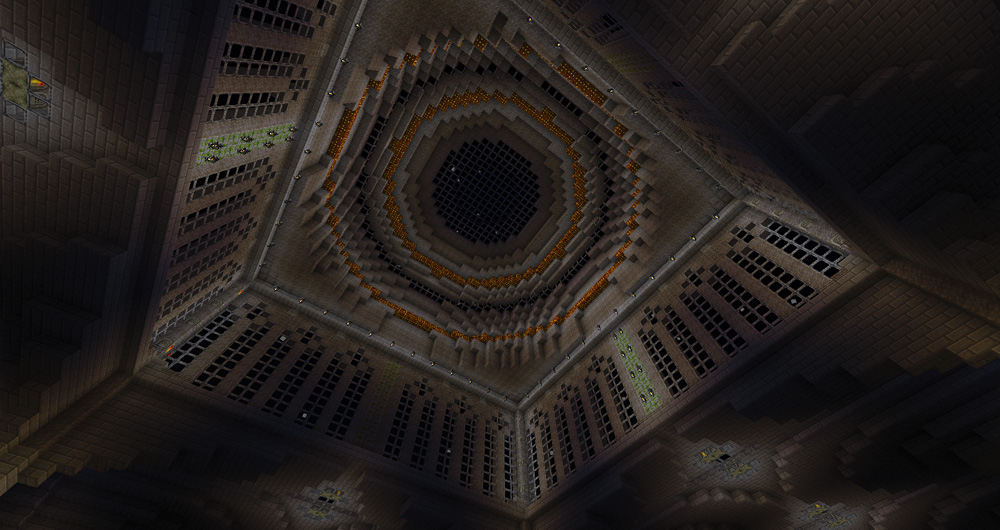
I had oral surgery last week (soft tissue graft so my molars won't fall out), which meant a lot of sitting at home with a lot of extra time on my hands while the drugs messed with my brain. Of course, I did what any other reasonable person riding a Vicodin high would do: I built a cathedral in Minecraft.

Now, I did use a very nice program called MCEdit to take care of most of the repetitive work, so it's not like I mined, crafted, and built this entire thing by hand. I did a ton of planning on graph paper, especially how to handle the various curves. All of the detail-work and parts-building was done in Minecraft proper (using the nice "new" creative mode), but I then used MCEdit to copy/paste/shift the bits around. I'm still not finished, but I figured I have enough so far to pique some interest.

There's also a catacombs level which leads to a large cavern that I'm not sure what I will do yet. I don't have any screenshots of those yet. Not that it would matter, since the catacombs are so dark that you can only see about 5 blocks in any direction, thanks to the darkening effects of being placed just over the void.
 
A view from the nearby NPC village
An external view of the sanctuary
Pretty lights at night!
Before I finished the sanctuary wall...
Main hall at night

Dome at night
A view from the pews
The sanctuary at night


Perfect view of the sunset

Thursday, January 27, 2011

Obsessions

It feels good to be coding again. Minecraft quickly turned into an addiction, which I have curbed by turning it into a project. I'm writing a Python script that converts Minecraft's world save data into Maya scenes.

When I was looking for Minecraft wallpaper for my desktop, I discovered an image where someone had taken Minecraft's level data and exported it to a different game engine, then used the game engine to export an OBJ to Blender. The final render looks like this:


I was blown away, but I quickly discovered that their method was quite specific to their software and, more importantly, Mac-only.

My script is still in the rough stages, but much of the basic functionality is there. It can open the .DAT files in which Minecraft stores its world chunks, strip out the section about what kind of blocks make up the chunk, then use that data to re-create the chunk inside of Maya. The end result looks like this:


It's an ugly pile of dirt, but it's a start. The blurry stuff on the top is water, and the various colored blocks are the different materials that make up the chunk. In the end, the script should create a set of geometry like this, as well as a proxy model, save to a file, then reference all the completed chunks into a central map scene.

I also have a list of features I'd like to add:
1) A shell mode where blocks that cannot be seen will not be created. Each chunk is 16 blocks wide, 16 blocks deep, and 128 blocks tall. That comes out to 32768 blocks per chunk...
2) A way to generate better water geometry. In the end, this may just have to be put in manually using planes.
3) UV layout and assignment to use the in-game textures.
4) Automatic lighting creation and placement for things like torches, lava, glowstone, etc.

I'm having a lot of fun with this. It's the biggest technical challenge I've had to tackle, and it's been a rewarding experience.